zondag 8 augustus 2021

Monthly and weekly reports available in Project Hours

The Project Hours report section has been updated with monthly and weekly status reports. This is a popular feature requested by users and a big enhancement to the Project Hours reporting feature. Often time sheets are on a weekly or monthly base so that is why our customers asked for this. Check it out on Project Hours or Project Hours NL.

The reports are easy to generate: users can select a time range to generate reports for and download the weekly or monthly statements in Excel.


Example of a weekly statement in Excel:


 That's it for now, more features to follow!

Regards,

Bert-Jan


maandag 22 maart 2021

New web sites live!

Project Hours has new web sites with product information, a blog and time tracking articles! The websites are build by Imre de Groot from Gegist Bestek Marketing. A huge leap forward compared to the old home pages:

  • More product information in a much friendlier navigation structure.
  • Optimized for SEO, Project Hours will be easier to find in search engines.
  • Built in Wordpress, completely seperate from the time tracking functionality (a .Net site), much easier to update and maintain, no need to deploy all code for a content update.
Check out the English site on projecthours.online or the Dutch site on projecthours.nl and let me know what you think! Tips for improvement are welcome.


vrijdag 26 februari 2021

New feature: planning board

On request of a client I added a planning board to Project Hours. This will allow for specifying hours that are planned for a project and a comparison with hours that are actually registered. 

Many clients still do this kind of planning in Excel. This is prone to errors, it is easy to accidentally erase data, or even delete the excel file that holds the administration. The Project Hours planning board is a more robust and user-friendly way to keep track of planned hours. Hours can be planned per user, for a project or for activities in a project.


Hopefully many users will benefit from this new feature!

Let me know what you think of it..

Regards,

Bert-Jan

maandag 28 december 2020

New feature: Register Materials and Costs

Today Project Hours received a new feature, it is now possible to register materials and calculate totals material costs for projects.  The feature has been developed based on feedback from several users. Currently materials can only be registered via the website, the mobile apps will follow soon..

Below are the new screens that are now available:


Define material units

Register materials with projects

Create overviews and download Excel reports


That's all for now. Next step will be to include this feature in the mobile apps. 

Please try out the new functionality and do not hesitate to send feedback to info@projecthours.net!

Regards,

Bert-Jan

zondag 1 november 2020

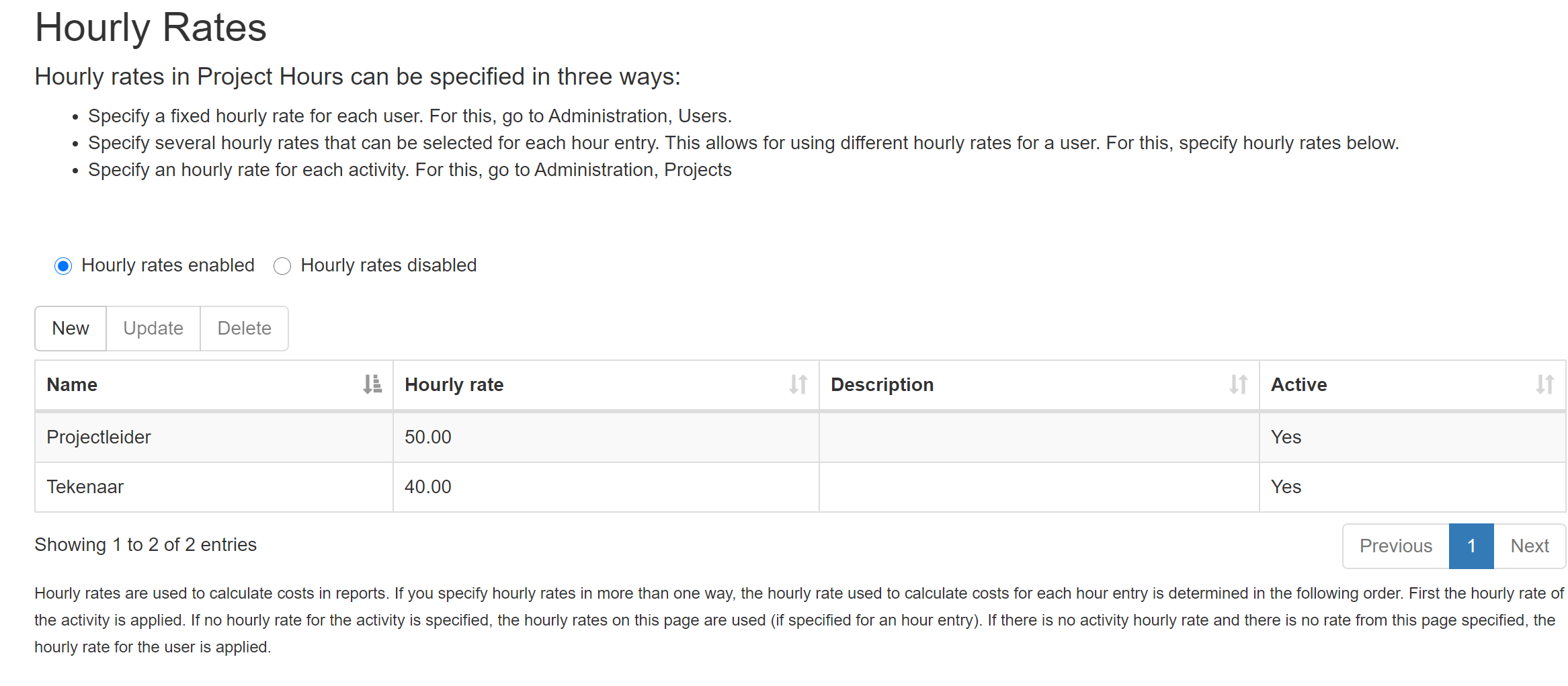
New feature: multiple hourly rates per user

On request of a client a new feature has been added to Project Hours: multiple hourly rates per user. This is useful because often users work in different roles on a project and each role can have a different hourly rate. To use this feature, go to 'Administration, Hourly Rates', specify your rates and enable the feature. Currently this is only available when entering hours via the web site, mobiles apps will follow soon..


vrijdag 2 oktober 2020

Working on Outlook integration for Project Hours

The redesigned apps for iPhone and Android are live in the stores now, time for the next improvement.. A customer asked for Outlook integration! Great idea, this will allow users to enter time directly from the calendar, for instance to register meeting time. Improved productivity and an opportunity to advertise Project Hours in the Outlook Add-in store :-)

So I am investigating what is needed to create a Project Hours Outlook add-in. Outlook web add-in, security, a design for the plugin. The plugin will allow for selecting a project and activity in Project Hours and storing this together with the meeting duration and date. And there will be a button to jump to the full project hours web site for more advanced things like updating time entries or checking time entries for that week.

I have a simple add-in up and running, I have a security design in mind, check  Privacy and security for Office Add-ins for some considerations,  now it is a matter of building all this. To be continued..


zaterdag 29 augustus 2020

Beta testing voor new mobiles apps started

Public beta testing is now on-going for both the iOS and the Android apps for Project Hours! We completed the internal testing round, many issues were ironed out. 

A challenge was to get listview items in projects and activities lists to fold out correctly when tapped on by the user, especially on iOS. Also, initially some page crashed in release mode because of empty properties in the xaml page make-up. The strange thing was that these pages showed up ok in debug configurations, but apparantly release mode is less forgiving.  The xamarin forum is very useful to find answers: One of my questions on the Xamarin Forum

You can try-out the Android and iOS beta's on: (note that if you install this, your phone will write hours to a test database, you will have to unsubscribe to return to production).

Join beta on Android

Join beta on iPhone

Any help is much appreciated!

Regards,

Bert-Jan


zondag 26 juli 2020

Completed new UI and signup feature for mobile apps

I did a lot of work on the new UI and features for the Project Hours mobile apps.
- New UI designed
- Pages added to signup for a trial period.
- Pages added to invite other users to sign up.
I am now working on a page to manage projects and activities in the mobile apps. Currently these can only be edited on the web site. 
Once I have finished the development work, I will create extensive app store pages for Google Play and the Apple Store. Together with the new features, the Project Hours app will be much better visible and hopefully this will attract many new users!
First screen for new users. There is a image carousel with 7 images and feature list.
First screen of signup wizard. Maybe I should improve the layout of the welcome message.
Once an organisation has signed up, it is easy to setup teams by inviting new members.

zondag 14 juni 2020

Developing new look for mobile phone apps

The past week or so I worked on setting up new mobile phone apps for Project Hours. Again it will be a Xamarin Forms project with a shared library with UI pages and business logic, and an Android app and a iPhone (iOS) app that use that shared library. I created a new page UI design that is going to replace the old header.  Thanks to  Andrew Hoefling's Xamarin Blog with a good explanation on how to design page headers.


Old look and feel (currently in the app stores):

New look and feel (better release this asap..) Looks so much better..


Above new code currently runs on Android, must test this on iOS now.
To be continued,
Bert-Jan

zaterdag 16 mei 2020

Received useful feedback from customers

A product must be improved continuously, and beyond that it is fun to add new features! I believe that it is best to add something that customers and reviewers asked for. So in the coming period Project Hours will be updated with a few things that users requested.

Notification feature 
Nobody likes filling in hours in a time-tracking tool. It is something on the side that has to be done. It is often forgotten which leads to huge backlogs of time-tracking to do. To help prevent this, a daily or weekly reminder to fill in your hours will help. The Project Hours mobile apps will be updated so users can schedule reminders that will appear as notifications on their phones. I am not sure yet how to display reminders on laptops and PC's. Email reminders? Something to consider.

I will also add warnings for timers that run longer than a day. Usually these timers were started to measure time on a tasks but the user forgot the stop the timer. Perhaps a reminder every hour is useful..

Easy sign-up from mobile phones
Currently, if you are interested to start using Project Hours, you have to sign-up via the web site. But I think it would help finding new customers if companies can sign up up and organise their projects and team directly in the Project Hours iPhone or Android app. It will also help to advertise Project Hours on app listing sites like https://getapp.com

Enough to do, to be continued..


vrijdag 27 maart 2020

Working on new landing page for potential customers

Project Hours is always looking for new customers and it is important to provide an easy entry path for interested companies. At the moment the Project Hours landing pages looks like this:


Works reasonably well. Unfortunately many people try out the demo but do not sign up for the free trial. Missed opportunity for both sides. So I am going to combine these buttons to one button that will say 'Try it out now'. User that try out Project Hours will go through a short wizard to setup a demo account. In this way, everybody that tries out the system, basically gets a free trial immediately.

To be continued..

vrijdag 20 september 2019

Integration with Google Calendar

On request of customer I am working on integrating Project Hours with Google Calendar. Work has been progressing nicely and a fully functional demo is available on the project hours test site: Google Calendar in Project Hours. What it does is that every time hours are saved in Project Hours via  the web interface or mobile app, an entry is created in a specified Google Calender. Only one (company) calendar per organisation can be specified.

In this way, a dashboard with work items is created that can be used for planning for example.


I am thinking of adding a feature where users can specify their own Google calendar for a per user overview.  Or an integration the other way around: use Google Calendar to register hour entries in Project Hours. I have investigated this and it looks like the only way to do this is to create a Chrome plug-in that adds Project Hours menu items to the Google Calendar web page. But first we are going to do some testing and release this to the Project Hours production environment. To be continued..
Bert-Jan


vrijdag 1 februari 2019

New Project Hours UI banner and landing page design live!


Today I published the new Project Hours look and feel to the live site
For a while I had felt that the design of the web site had become somewhat stale, no colours, only white and gray. To change that, the company banner on every page has been brought in line with the design of the landing pages (see image below). Thanks to Vanessa Lappenschaar-Berg for design tips!
I hope that the new design will lead to a higher conversion rate on the Google Ads.

  
There are no functional changes in this release. I did make a change to the way caching of data is handled, there has been a case of session data mix-up between two users of different organisations (very scary, should never happen again!)

For those interested: I added the setting 'OutputCacheLocation.None' to the MVC outputcache attribute on every MVC controller to make sure no pages are cached server-side that could cause data mix-up between users:
  [OutputCache(NoStore = true, Duration = 0, Location = System.Web.UI.OutputCacheLocation.None, VaryByParam = "*")]

The NoStore = true and Duration is 0 settings were already there, but apparently that was not enough.
More background info : StackOverflow Sessions Mixed ASP.NET and MVC Output cache set to None

Planned for the next release: add an auditing function to all changes to time entries so it is always possible to see what the entire history of a time entry has been. (Currently this must be done by restoring database backups, a lot of hassle).

That's all for now,
Bert-Jan


zondag 9 december 2018

Moved to Let's Encrypt certificates

Panic. Google Chrome gave certificate errors on https:projecthours.net Turns out Chrome is not accepting certain ssl certificates any longer. See: https://knowledge.digicert.com/alerts/ALERT2562.html


So I updated the Project Hours web site  to use a free Let's Encrypt certificate. Turns out it was quite easy to configure on Azure following this tutorial: https://www.tecklyfe.com/how-to-setup-lets-encrypt-ssl-certificates-for-an-azure-web-app/. And it there is an automated proces to renew the certificate every 90 days, which is great.


zondag 26 augustus 2018

Started on a new project: StudentSign

Last year, my son spent a year abroad on a highschool in Canada. We had to sign many documents that were emailed to us, especially because he was 16 at the time he went to Canada, so his parents' consent was needed often, for instance for a weekend trip around Canada, or a school canoeing trip.

Signing documents was a tedious process: print the document, sign on paper, scan the signed document and send an email back. It must be very time-consuming for student exchange organisations in this way, having to deal with all the emails with documents from students, parents and schools. It occured to me that there must be an easier way: digital signatures on documents stored in the cloud!

After a little bit of investigation I decided to build a platform on top of an existing digital signature platform. In this way, it is easier to get started and I can focus on the use case for signing documents for exchange students instead of reinventing the wheel by developing a new digital signature platform.

Current state of the project is that a sandbox experimental environment exists and that I am going to conduct interviews with organisations to validate the idea and find out if organisations really need this solution.  We can use the sandbox to experiment with documents, work flow and signatures.

A landing page with an overview of the project has been created:  https://studentsign.net


dinsdag 13 maart 2018

Added project costs tracking

On request of a client I added project costs tracking to https://projecthours.net. Administrators can add hourly rates to users. In reports, totals costs per project or activity are displayed, based on hourly rates.  I hope that with this new and easy-to-use feature, Project Hours will be useful to even more companies..


zondag 4 februari 2018

Marketing is important, created improved landing pages

Project Hours has been online for a few years and we have a group of loyal costumers. To attract more customers I realized we must improve our presence on the web. So I created landing pages with an attractive design, a Dutch version and an English version. The Project Hours Google ads will link to the new pages from now on.

Next is to work on a request from a customer: add hourly rates to users so users can calculate project costs. That's it for now, Bert-Jan.


zaterdag 28 oktober 2017

SQL temporal tables to collect invoice data for customers

Projcct Hours Time Tracking has been online now for over a year and it is time to send out the first invoices to customers. I realized that in order to correctly calculate the amounts to charge for users I will need historical data, i.e. when did users start or when where they set to inactive.

To record historical data I decided to use SQL temporal tables. I could have used database triggers to record table changes but after reading up on SQL temporal tables I decided to give it a try. Here is a good link to learn about this feature: SQL Server Temporal Tables Recipes .

One thing I like very much about temporal tables is that there are special queries that make querying on time intervals much easier, for instance you can do a query like

SELECT email, SysStartTime, SysEndTime FROM AspNetusers
FOR SYSTEM_TIME FROM @StartDate TO @EndDate
WHERE Active = 1 

This will retrieve all records with changes in a certain time period. Writing this yourself in SQL is more complicated. A good article explaining how to query temporal tables: How to query data on versioned temporal tables in SQL

This is what tables with history look like in SQL Server Management Studio:


That's it for now,
Bert-Jan

vrijdag 25 augustus 2017

ProjectHours needs online marketing

ProjectHours has been online for a few years. It is reliable and there are some happy customers. Now the time has come to pay attention to expanding the customer base. I think the best way would be to look for cooperation with people that have experience with online marketing and support. My knowledge is primarily technical and I think it will be benficial for ProjectHours if I start working with someone with online marketing expertise. I have posted this message on LinkedIn as well. Let's find out if I can find some interesting people to work with!

zondag 11 juni 2017

Updating Windows 10 UWP app, added a privacy policy

I am adding the time feature to the Project Hours Windows 10 app. All is going well but I realized a really had to create a privacy policy because time management data is confidential information. That is why Project Hours has a privacy policy now! It is very basic, but it is a start..